
Sense Home
Sense Labs, Inc.House & Home
3.9488.00 Reviews
- Version
- 2026.12
- Installs
- 100.00K
- Age Rating
- Everyone
Screenshots


Our Review of Sense Home
 Analysis by Appyee
Electricity is easy to ignore until a bill arrives or something in the house behaves strangely. I installed Sense Home because its central promise is more useful than a simple monthly total: it tries to help me understand what is using electricity right now. That change in perspective matters. Instead of seeing the home as one large meter reading, I can use the app as a practical way to investigate patterns, check whether equipment is still running, and notice unusual activity.
Developed by Sense Labs, Inc., this free House & Home app is aimed at people who want more awareness without manually checking every appliance. It is available to an Everyone audience, runs on operating systems from version 10 onward, and has reached over one hundred thousand installs. Its average of 3.9 from around two thousand ratings suggests a useful but not universally effortless experience, which matches my impression: the idea is strong, while the quality of the results depends heavily on the home setup and on how much patience the user brings.
What makes Sense Home useful beyond a basic energy total
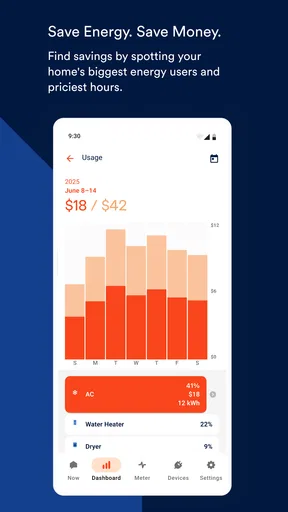
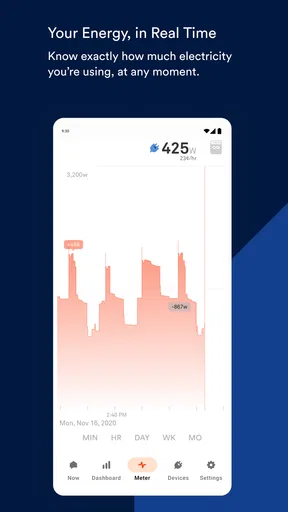
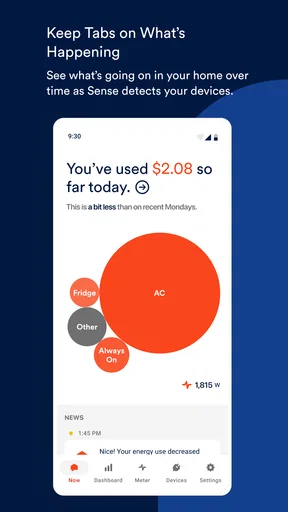
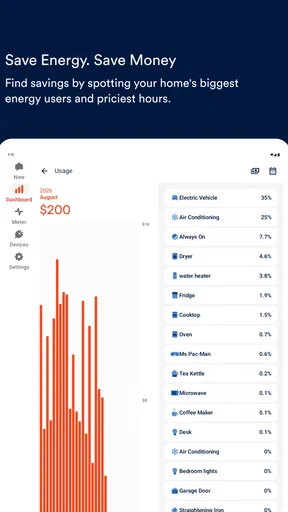
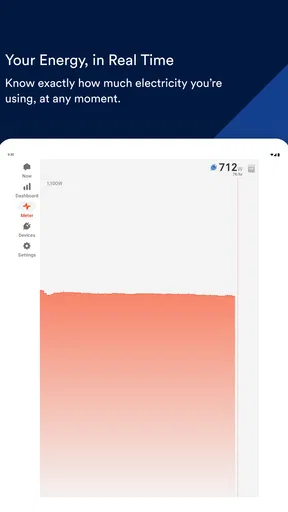
The most important capability is identifying household electricity use instead of showing only a combined figure. A standard utility portal can tell me how much power the home consumed over a billing period, but that information arrives too late to guide a decision in the moment. Sense Home is more interesting when I want to ask a narrower question: Is the heating system still active? Did a high-use appliance switch on? Is something running when everyone believes the house is empty?
That distinction turns energy monitoring into a form of household troubleshooting. I do not have to begin with a spreadsheet of every appliance. I can look for activity that stands out, then connect it with what is happening physically in the home. If a device has been left on, the app can make that situation easier to notice. If the pattern is normal, I can stop worrying without walking from room to room.
I also like that the app sits between two extremes. On one side is doing nothing beyond waiting for the utility statement. On the other is installing separate smart plugs or dedicated monitors on every important device. Sense Home is designed to give a broader view of the electrical system, so it is most appealing to people who want a home-wide perspective rather than a collection of isolated readings.
Why whole-home awareness changes everyday decisions
A single total often hides the reason a bill is high. A home may use more electricity because of climate control, a water heater, a refrigerator working harder than usual, or a device that was accidentally left on. Knowing the likely source is more actionable than knowing only the final amount. I can change a habit, investigate an appliance, or decide whether a new routine is worth keeping.
The app is also useful for building a better mental picture of the home. After watching activity over time, I can connect certain changes with familiar routines: cooking, laundry, sleeping, leaving for work, or returning in the evening. That context is more valuable than treating every fluctuation as a problem. Energy monitoring works best when it helps me recognize normal behavior first, because unusual behavior becomes easier to spot afterward.
There is a safety angle as well. The store summary emphasizes seeing what is running and avoiding trouble, and I think that is a more realistic expectation than assuming the app will diagnose every electrical issue. It can encourage me to notice activity that does not fit the household routine. It should not replace an electrician, smoke detector, carbon monoxide detector, or sensible inspection of a suspicious appliance.
How the experience works in practice
My first recommendation is to treat the early period as observation rather than judgment. When an energy-monitoring app begins learning a home, not every device label will necessarily feel immediately obvious. I would give the system time to establish recognizable patterns, then check those labels against real events. Turning on an appliance deliberately and watching for the corresponding change is a better test than assuming every displayed category is correct from the start.
This is one of the app’s less obvious strengths: it can become more useful when I use it as a conversation between the screen and the physical house. If I see activity that appears to belong to a particular device, I can verify it by switching that device off and on during a quiet moment. That simple process helps separate a genuinely helpful identification from an assumption based only on timing.
For a busy household, I would avoid trying to analyze every small fluctuation. The practical goal is to find meaningful loads and recurring patterns. Large equipment, devices that run for long periods, and anything that affects comfort or safety deserve attention first. Chasing every minor change can make the app feel more complicated than it needs to be.
A realistic evening at home
Imagine coming home after work, starting dinner, and later wondering why the house still seems electrically active after everyone has gone to bed. With a normal utility dashboard, I might have to wait for a later summary. With Sense Home, I can use the current activity as a prompt to investigate. Perhaps the explanation is ordinary, such as a heating cycle or refrigeration. Perhaps a forgotten appliance is still operating. The value is not that the app makes the decision for me; it shortens the path from suspicion to a sensible check.
That scenario also shows why context matters. A sudden increase while cooking is not automatically wasteful, and a device running overnight is not automatically dangerous. I need to interpret the information alongside the household routine. The app gives me a useful clue, but my own knowledge of the home remains essential.
Using the app to test habits rather than chase perfection
I found the strongest long-term use in comparing routines. For example, I can change one behavior—such as avoiding unnecessary standby use or adjusting when a high-demand appliance operates—and then watch whether the household pattern changes. Changing one thing at a time makes the result easier to understand. If I alter several habits simultaneously, the app may show a different total, but I will not know which decision made the difference.
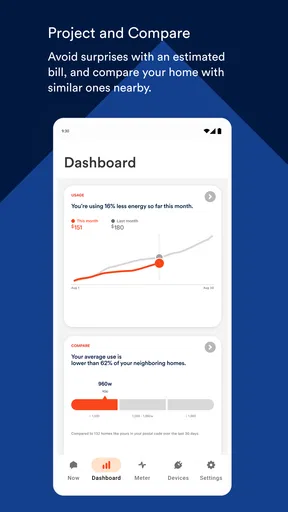
This approach is more realistic than expecting dramatic savings from every small adjustment. Sense Home is better as a feedback tool than as a magic cost-cutting button. It helps me see whether an idea is having a meaningful effect, while the actual financial result still depends on the home, the utility arrangement, and the household’s behavior.
Questions about setup and daily use
One practical question is whether the app alone can monitor a home. I would not assume that downloading it is the entire process. Its usefulness depends on the compatible monitoring arrangement and the electrical information reaching the service. Anyone considering it should check the installation requirements for their home before treating the app as a standalone software meter.
Another question is whether I need to keep watching it constantly. I do not think so. A short check during unusual activity, followed by occasional reviews of recurring behavior, is more sustainable. Constantly refreshing an energy screen can turn a helpful tool into another source of noise. I would use it when making a decision, checking an unexpected pattern, or learning how a new appliance affects the home.
People also often wonder whether the app can identify every device perfectly. I would approach that expectation carefully. Electrical behavior can overlap, and several appliances may operate close together. The most reliable workflow is to confirm important identifications with controlled tests and to treat uncertain labels as clues rather than facts. That is especially important before making a costly replacement decision.
The best scenario for Sense Home
The clearest fit is a homeowner or household manager who wants a whole-home view and is willing to investigate patterns. It is particularly useful when electricity costs feel mysterious, when a home has several large loads, or when people regularly leave and return at different times. In those situations, knowing what is active can be more valuable than receiving another generic reminder to save energy.
I can also see value for someone moving into a new home. During the first weeks, the app can support a kind of electrical orientation. Instead of guessing which systems dominate use, I can observe how the property behaves through ordinary routines. That information can influence later choices about maintenance, scheduling, and whether a particular appliance deserves closer attention.
It is less compelling for a renter who cannot use the required monitoring setup, or for someone who only wants a simple monthly cost estimate. A utility company’s own portal may be enough for that second group, especially if the main goal is checking a bill rather than understanding live household activity. Likewise, people who want detailed readings from one specific appliance may prefer a dedicated plug-in monitor designed for that single device.
Where it compares well with usual alternatives
Utility dashboards are usually convenient because they already relate to the account and billing history, but they tend to be less immediate and less focused on individual household activity. Smart plugs can provide detailed information for selected devices, yet they require choosing, installing, and managing those devices one by one. Sense Home occupies the middle ground: broader than a plug, more investigative than a basic billing chart.
That middle ground is also the trade-off. A smart plug gives me direct control and a clear reading for the device attached to it. Sense Home gives a wider picture, but interpreting that picture can require more judgment. If my priority is switching a lamp remotely or measuring one appliance with certainty, a focused accessory may be the better tool. If my priority is understanding the home as a system, Sense Home has the more suitable perspective.
Trade-offs that matter before relying on it
The first limitation is interpretation. Energy information is only useful when I understand what I am looking at. A displayed activity pattern may be perfectly normal, and a quiet period does not prove that every concern has disappeared. The app can make investigation easier, but it cannot turn an ambiguous electrical signal into a professional diagnosis.
The second is commitment. The more value I want from the app, the more willing I need to be to learn the household’s patterns. Someone who installs it, glances once, and expects an instant list of perfectly identified appliances may be disappointed. I see it as a tool that rewards a little observation, especially during the first stage of use.
There is also a difference between awareness and savings. Seeing energy use can motivate better decisions, but the app cannot reduce consumption by itself. Some loads are necessary, some savings require spending money on equipment, and some changes may reduce comfort. I would use the information to prioritize sensible actions rather than treating every high-use event as waste.
The current version is 2026.12, and the app has been available since late summer of 2016. That long presence gives it the feel of an established monitoring product rather than a short-lived experiment, but I would still judge it by my own setup and goals. Its free price makes trying the software less intimidating, while the real commitment may be the monitoring arrangement and the attention needed to interpret the results.
How I would avoid common mistakes
I would not compare two different days without considering weather, occupancy, cooking, laundry, and other major changes. A higher reading may simply reflect a different routine. I would also avoid switching several appliances at once when testing identification, because overlapping activity makes the result harder to interpret.
For safety-related concerns, I would use the app as an early signal only. If an appliance smells hot, trips a breaker, makes an unusual sound, or behaves dangerously, I would stop using it and seek appropriate professional help. Energy monitoring is useful for awareness, but it is not a substitute for electrical inspection.
Who gains the most from this app
Sense Home is at its best for people who want explanations, not just totals. That includes homeowners trying to understand rising consumption, families with complicated schedules, and curious users who want to connect daily habits with electrical demand. It can also help someone decide where to focus first instead of making random changes throughout the house.
I would skip it if I want a completely passive experience, a single-device measurement, or a remote-control system. I would also be cautious if I am unwilling to confirm what the app is showing. In those cases, a utility dashboard or a targeted smart plug may deliver a clearer result with less interpretation.
For me, the deciding benefit is the shift from “How much electricity did the house use?” to “What is the house doing right now, and does that make sense?” That question leads to better checks, more informed habits, and occasionally an important discovery. The experience is not effortless, and its readings should be treated thoughtfully, but the broader view makes it more useful than a basic consumption chart.
With a 3.9 average from around two thousand ratings and nearly five hundred written reviews, the public response feels appropriately mixed for a tool whose value depends on both technology and household context. I would recommend trying it to someone who enjoys practical monitoring and wants to learn the behavior of a home. I would not recommend it as a guaranteed savings solution or as a replacement for professional safety advice. Used with realistic expectations, Sense Home can turn invisible electricity use into information I can actually act on.
Verdict
Strengths of Sense Home
- Quick access to frequently used apps and contacts
- Smart shortcuts adapt to your daily usage patterns
- Clean interface keeps the home screen easy to navigate
- Useful information cards can reduce the need for extra widgets
- Lightweight design generally feels responsive on supported devices
Limitations of Sense Home
- Some features may require permissions that affect user privacy
- Personalized suggestions can be inaccurate at first
- Interface changes may take time to adjust to
- Compatibility and performance can vary between Android devices
- Limited customization compared with advanced launcher apps
Similar Picks in This Category
View All
Universal TV Remote Control
CodeMatics Media Solutions3.9

AlfredCamera Home Security app
Alfred Systems Inc.4.7

Planner 5D: AI Home Design
Planner 5D4.5

Universal Tv Remote-Cast to TV
One Music Player4.1

Zillow: Homes for Sale & Rent
Zillow Group4.8

99acres Buy/Rent/Sell Property
infoedge.com4.3
Frequently Asked Questions
What is Sense Home and what does it do?
Sense Home is a mobile launcher and personalization app designed to make your Android phone easier to use. It can organize applications, provide quick access to frequently used tools, display contextual information, and offer customizable home-screen layouts. Depending on the device and version, it may also include recommendations, news, weather, and other content intended to make everyday navigation more convenient.
Is Sense Home free to download and use?
Sense Home is generally available as a free application or as part of selected smartphone software, but the exact availability can depend on the manufacturer, region, and Android version. Some features may require additional permissions, connected services, or bundled content. Before installing, users should check the current Google Play listing for pricing details, supported devices, in-app purchases, and any advertising or optional services included.
What permissions does Sense Home require?
Because Sense Home works as a launcher and may provide personalized recommendations, it can request access to applications, device usage information, notifications, location, or other system features. These permissions help it show relevant shortcuts and content, but not every permission is essential for basic use. Review each request carefully, deny anything unnecessary, and check the app’s privacy policy before continuing.
Can Sense Home affect battery life or phone performance?
Sense Home is designed to run continuously because it manages the home screen, app shortcuts, and background personalization features. On modern phones, its impact is usually modest, although battery consumption may increase if recommendations, location-based content, animations, or frequent updates are enabled. If the phone feels slower or battery drain becomes noticeable, disable optional features or switch to a simpler launcher.
Can I customize or remove Sense Home from my phone?
Customization options vary according to the version of Sense Home and the device on which it is installed. Users may be able to change layouts, shortcuts, wallpapers, widgets, and default-home settings. If it came preinstalled, it may not be fully uninstallable, but it can often be disabled, updated, or replaced by another launcher through Android settings. Always confirm the default launcher before making changes.
